
Your website looks fine on your laptop. On your phone, it drags. Visitors tap a link, wait, and leave before the page finishes loading. Then someone tells you to "just move to Next.js," and now you are wondering if your whole site needs to be rebuilt.
I have been building dynamic websites since 1997. In that time I have worked through almost every stage of how the web learned to build pages on the fly: CGI and Perl, ASP, PHP, content management systems like WordPress, and now Next.js. This post walks through that history from the point of view of someone who shipped real sites in each era.
The pattern is simple. Every big shift happened because the old way was too slow, too expensive, or too hard to maintain. That is still true today, and it is the best lens for deciding what your own site needs next.
What did dynamic web development look like in 1997?
In 1997, if you wanted a website to do anything beyond showing fixed text and images, your options were CGI scripts (usually written in Perl) or Microsoft's ASP. That was basically it.
A "static" page is a file that looks the same for everyone. A "dynamic" page is built at the moment someone asks for it, so it can show a form result, a list from a database, or a visitor counter. CGI was the original way to do this. When a visitor submitted a form, the web server started a small program, the program printed out HTML, and the server sent that HTML back to the browser.
I used CGI, Perl, and ASP to build the website for a company I ran back then. That company and its site are no longer active, but the lessons stuck with me:
- CGI and Perl were fine for the job. They worked on cheap Linux hosting and handled forms and simple logic well. The downside was that each request started a new program, which got slow as traffic grew.
- ASP was quite expensive. It ran on Windows servers, and Windows hosting cost noticeably more than Linux hosting at the time. For a small business, that cost added up fast.
So even in 1997, the choice of technology was already a business decision, not just a technical one. That has never changed.
Why did PHP take over?
I switched to PHP around 2003 or 2004. I honestly don't remember the exact year, because everything was moving so fast at that point.
PHP solved the problems I had with the earlier tools:
- Faster to write and run. Instead of starting a separate program for every request like CGI, PHP code sat inside the HTML page and ran directly on the web server.
- Cheap hosting. It worked on the same affordable Linux hosting I was already using. No expensive Windows server needed.
- A free database to pair with. PHP worked naturally with MySQL, so even one developer could build real features: member logins, product lists, news pages, and contact forms that saved to a database.
- Big-budget features became normal. Things that used to need a large budget were now within reach for small businesses.
That is the first big lesson of this history. The technology that wins is usually the one that makes good results cheaper and easier to reach, not the one with the most impressive features on paper.
How did WordPress and other CMS platforms change things?
From around 2003, I started moving into content management systems. Over the next few years I worked with WordPress, Joomla, and several others. By 2007, WordPress had become my main tool, and it stayed that way for a long time.
A CMS (content management system) is built on top of a language like PHP. Instead of a developer hand-coding every page, the CMS gives you a dashboard where you write content, upload images, and publish. The developer builds the theme and the features once, and the client runs the day-to-day.
This was a huge shift for clients. Before, changing a phone number or adding a news post meant emailing a developer and waiting. With WordPress, the business owner could do it themselves in a few minutes. Plugins added features like contact forms, SEO settings, and online shops without writing everything from scratch.
That convenience is exactly why WordPress still runs a large share of the web today. It is also where the problems started to show over time. Every plugin adds code. Every theme adds styling and scripts. A site that felt fast in 2010 can feel heavy now, especially on a phone with a weaker connection.
Why are we moving client sites to Next.js now?
Two reasons: speed, and how good the site looks and works across every device.
Next.js is a framework built on React, a JavaScript library for building interfaces. The key difference from a classic WordPress setup is when the page gets built. A typical WordPress page is assembled by PHP every time someone visits, pulling from the database, running plugins, and loading the theme. Next.js can build most pages ahead of time, so when a visitor arrives, the server just hands over a finished, lightweight page. Less work per visit means faster loading.
In my own projects, the difference shows up most on mobile. When I compare WordPress builds and Next.js builds in Google's PageSpeed Insights:
- Mobile: Next.js sites mostly score 80 or above, and they stay there.
- Desktop: Next.js sites score between 90 and 100, and stay stable.
- WordPress sites with a typical theme and plugin stack are usually far behind on mobile, and their scores tend to move around as plugins update.
The word "stable" matters as much as the number. A site that scores well once but drops after the next plugin update is not really fast. It is just fast on a good day.
A real example is sekarjagad.id, a bilingual site that now runs fully on Next.js with MDX. MDX lets us write content as simple text files with structured fields at the top (title, language, date, images), and Next.js turns those into fast, consistent pages. Because the layout is built once in components, it behaves the same on a phone, a tablet, and a wide desktop screen.
Here is what Google's PageSpeed Insights shows for the sekarjagad.id homepage as of October 2026:
| Metric | Mobile | Desktop |
|---|---|---|
| Performance | 82 | 97 |
| Accessibility | 95 | 95 |
| Best Practices | 92 | 92 |
| SEO | 100 | 100 |
Mobile performance sits above 80 and desktop is close to perfect, which is the pattern I see across our Next.js builds. Accessibility, best practices, and SEO are the same on both devices, because the same components render everywhere.
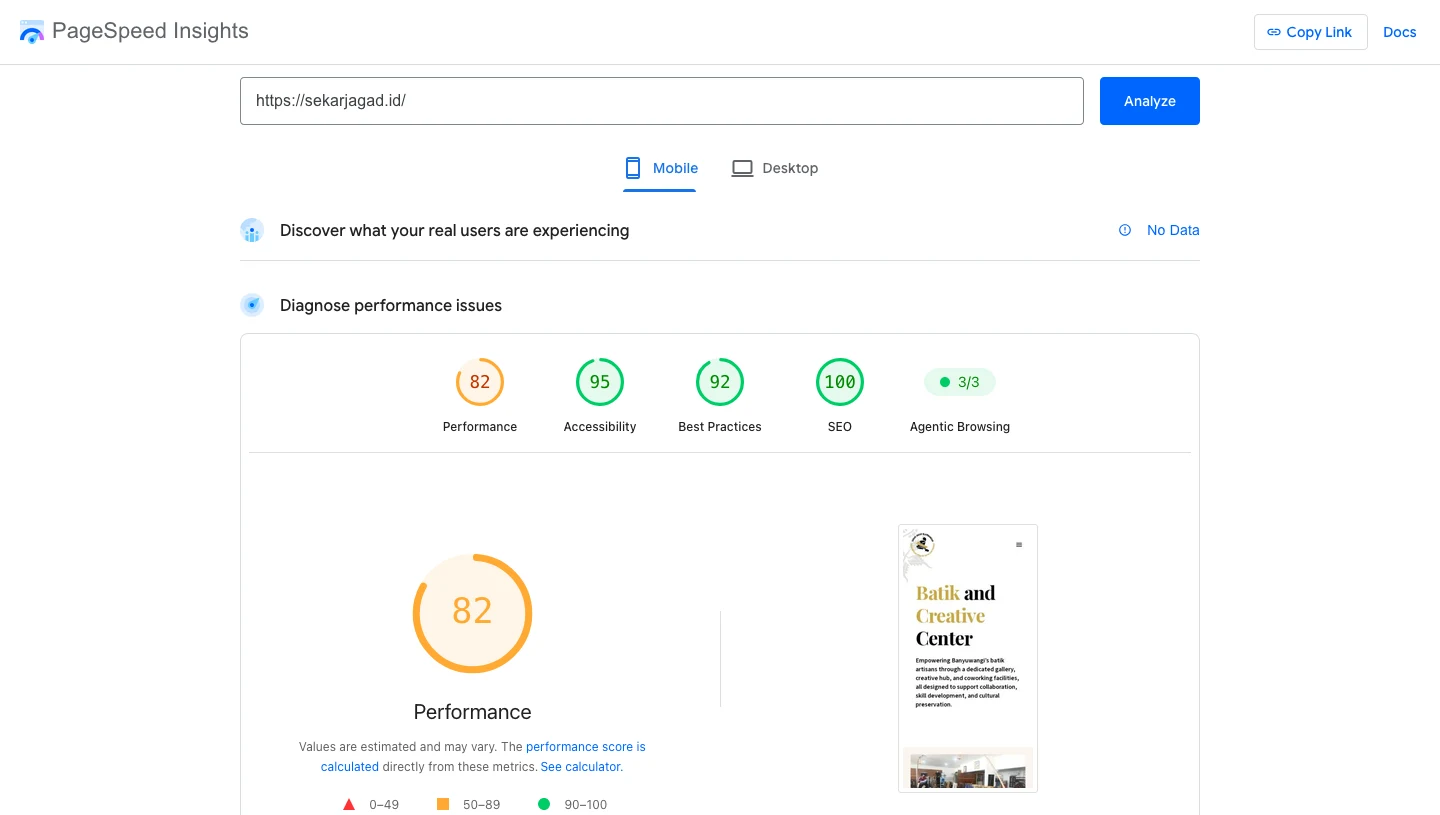
Mobile results for sekarjagad.id in PageSpeed Insights, October 2026.
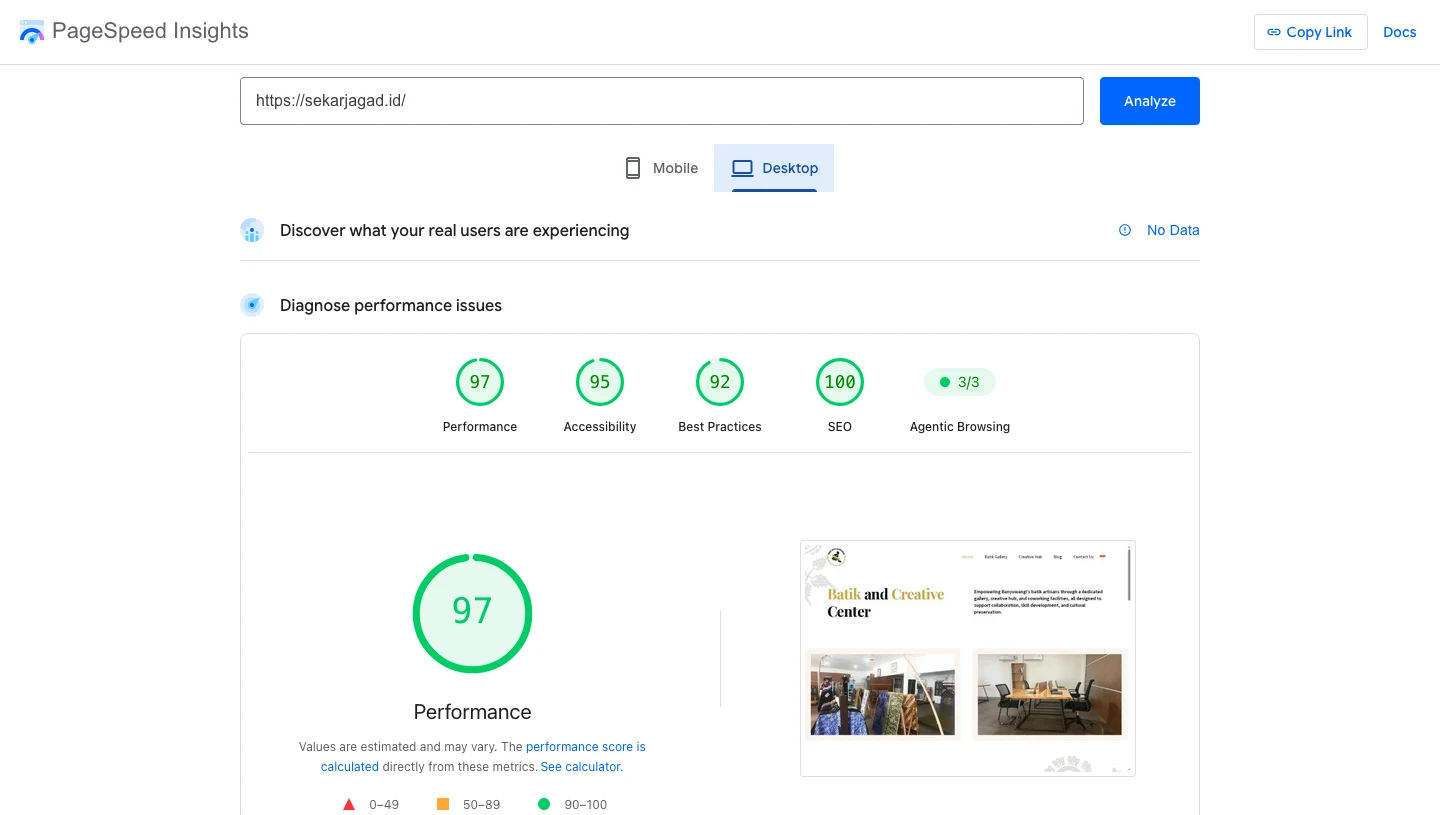
Desktop results for sekarjagad.id in PageSpeed Insights, October 2026.
Does that mean WordPress is finished?
No. And this is where a lot of "just rebuild it in Next.js" advice goes wrong.
On an earlier ecommerce project, we split the site in two. The public pages (home, about, product stories, blog) ran on Next.js with MDX, so they loaded fast for visitors. The shop and checkout stayed on WooCommerce, the WordPress ecommerce plugin. That project has since ended, but the approach is one I still recommend.
I chose WooCommerce for that part because it made it easy for the client to maintain their products. They already knew the dashboard. They could add a product, change a price, or update stock without calling us. Rebuilding all of that from scratch in Next.js would have cost more and made the client's daily work harder, just to chase a speed gain on pages where it matters less.
This hybrid setup is often called "headless" WordPress. WordPress manages the data in the background, and Next.js handles what the visitor actually sees. You get the speed of the new stack and keep the editing comfort of the old one.
So the real question is not "WordPress or Next.js?" It is "which parts of my site need which tool?"
What is the hardest part of switching to Next.js?
Honestly, the hardest part is that you have to learn from the beginning, and then keep up.
After years of WordPress, I knew where everything lived: themes, plugins, custom fields, hooks. Moving to Next.js meant starting again with React components, routing, build steps, and deployment. Even the way content is structured changes. A custom field in WordPress becomes a field in an MDX file, and both sides need to match exactly or the page breaks.
And the learning does not stop. The JavaScript world moves faster than PHP ever did. Next.js releases new versions regularly, and best practices shift with them.
For a business owner, the takeaway is simple. This is not something to hand to whoever is cheapest. You want someone who has done it on real projects and is still keeping up. That is the part we take on, so you don't have to.
As a technical team, we are happy to walk you through the flow, the structure, and every technical decision along the way. We don't leave clients in the dark. Most of a switch like this is collaborative: you know your business, we know the stack, and we are working toward the same goal, a site that performs better.
So which one should you choose for your site?
My honest advice: if budget is the main concern, start with WordPress, then migrate to Next.js later.
WordPress is still the fastest and cheapest way to get a working, editable site online. You can launch, test your content, and start getting visitors. When the site grows and speed starts costing you visitors or sales, that is the right time to move the front end to Next.js. If you have an online shop, you may never need to move the shop itself, as the WooCommerce example above shows.
If your budget allows from the start, and speed on mobile is critical to your business, building on Next.js from day one saves you a migration later.
Either way, the history from 1997 to now points to the same rule. Pick the tool that gives you good results at a cost you can sustain, and be ready to move when that stops being true.
What do people usually ask about moving from WordPress to Next.js?
My WordPress site works fine. Do I really need to change anything?
Not necessarily. If your site loads well on mobile and you are happy with the results, there is no reason to rebuild just to follow a trend. Run a speed check first. If mobile scores are low or unstable, that is when it is worth talking.
Will I lose the ability to edit my own content?
No, if it is set up properly. You can keep WordPress as the place where you edit, while Next.js shows the content to visitors. For simpler sites, content can live in MDX files with clear fields that we set up for you.
Will moving to Next.js hurt my Google rankings?
A migration done carelessly can, mostly through broken links and missing redirects. Done properly, with every old URL mapped to its new one, the faster speed usually helps. We check technical SEO before and after every migration.
I have an online shop. Do I have to rebuild it?
Usually not. You can keep WooCommerce for products and checkout, and move only the public pages to Next.js. We used exactly that setup on an earlier ecommerce project.
Is Next.js more expensive than WordPress?
The build usually costs more upfront because it is more custom work. Hosting can be similar or cheaper, and you spend less time fixing plugin conflicts later. That is why I suggest WordPress first if budget is tight.
How long does a migration from WordPress to Next.js take?
It depends on the number of pages, custom features, and whether there is a shop. A small content site moves much faster than a site with complex custom fields or ecommerce. We give a clear estimate after looking at your site.
I'm not technical. How do I know if my site is slow?
You don't need to be technical. Our free audit tool checks your site's speed and technical SEO and explains the results in plain language.
What should you do next?
You don't need to decide on a rebuild today. Start with what you can measure.
- Run a free check on your site. Use our audit tool to see your speed and technical SEO issues in one report.
- Look at your mobile score separately. Most visitors are on phones. If mobile is far behind desktop, that is the first thing to fix.
- List what you edit most often. Products, blog posts, events, or just a few pages? This decides whether you need a full WordPress setup, a headless setup, or simple MDX content.
- Read how speed connects to visibility. Our post Why Ranking Doesn't Guarantee AI Visibility explains why technical foundations matter beyond Google rankings.
- Talk it through with us. If the results raise questions, book a consultation. I will look at your site and tell you honestly whether to stay on WordPress, go headless, or move fully to Next.js. You can also see the kind of work we do on our web development services page.
I have watched the web change five or six times since 1997. The sites that do well are not the ones on the newest technology. They are the ones whose owners chose the right tool for where their business is now.